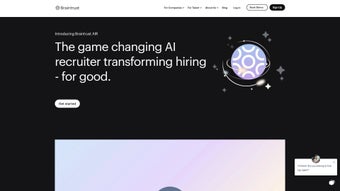

Download Braintrust AIR – AI Recruiting Tool, Free, Secure, Update
Overview & Core Features of Braintrust AIR
Braintrust AIR is an AI‑driven recruiting platform built for modern HR teams that demand speed, accuracy, and security. In a market where talent shortages and long hiring cycles can cripple growth, this tool offers a complete end‑to‑end workflow—from crafting SEO‑optimized job descriptions to delivering objective, data‑backed interview scores. The solution works seamlessly across Windows, macOS, Android, and iOS, ensuring recruiters can stay productive whether they’re at a desk or on the move. Its cloud‑native architecture means there’s no bulky software to install; all updates happen automatically, keeping the AI models fresh and the user experience smooth.
At the heart of Braintrust AIR are three pillars: automation, intelligence, and flexibility. The AI Job Description Generator takes a few bullet points and creates a compelling posting that ranks well in search engines, attracting a larger pool of qualified candidates. The real‑time Candidate Matching engine scans millions of profiles, ranking candidates based on skill relevance, cultural fit, and past performance metrics. Finally, the Asynchronous Video Interview module lets candidates record responses on their own schedule; a built‑in speech‑to‑text and sentiment analysis engine then scores each answer, delivering a numerical grade that reduces bias and speeds decision‑making.
Security is baked into every layer of the platform. Braintrust AIR complies with SOC 2 Type II, ISO 27001, and GDPR, offering end‑to‑end AES‑256 encryption and role‑based access controls. The system also generates detailed audit logs, making it suitable for enterprises with strict compliance requirements. Below is a concise feature list that highlights what makes this software stand out.
- AI‑Generated, SEO‑Optimized Job Descriptions
- Real‑Time Global Candidate Matching Engine
- Asynchronous Video Interviews with Automated Scoring
- Customizable Scorecards & Analytics Dashboard
- Secure Cloud Storage with End‑to‑End Encryption
- Cross‑Platform Compatibility (Windows, macOS, Android, iOS)
- Native Integrations for ATS, HRIS, and Collaboration Tools
- Monthly AI Model Updates with No Manual Patching
Installation, Usage & Compatibility – Getting Started Quickly
Braintrust AIR is designed for frictionless onboarding. Begin by visiting the web portal, entering a business email, selecting either the free tier or a paid plan, and confirming your domain. Within minutes, the system provisions a secure workspace and sends an activation link to your inbox. Because the application is cloud‑native, there is no traditional installation; you simply log in via any modern browser (Chrome, Edge, Firefox, Safari) on a desktop or laptop.
For teams that prefer native experiences, downloadable clients are available for Windows 10/11 (64‑bit) and macOS 12 Monterey or later. Mobile apps support Android 8.0+ and iOS 13+. All clients synchronize in real time, ensuring you always see the latest candidate data and interview scores. The first‑time setup wizard guides you through essential configuration steps: define hiring stages, upload interview question banks, and set scoring rubrics. Interactive tooltips and short video tutorials appear contextually, reducing the learning curve for new users.
Once the environment is ready, creating a new role is as easy as clicking “New Role,” entering a few key responsibilities, and letting the AI generate a polished description. You can publish the posting directly to major job boards or share a custom URL with candidates. The Match Dashboard then surfaces ranked profiles, each accompanied by a “shortlist scorecard” that highlights skills, experience, and cultural fit. When a candidate is selected for an asynchronous interview, the system sends a secure link for video recording; after submission, the AI transcribes, analyzes sentiment, and assigns a quantitative grade.
The platform supports the following operating systems, ensuring broad accessibility:
- Windows 10, 11 (64‑bit)
- macOS 12 Monterey and later
- Android 8.0 (Oreo) and newer
- iOS 13 and newer
Integration options include native connectors for Greenhouse, Lever, Workday, and other leading ATS solutions, as well as a RESTful API for custom workflows. Whether you’re a solo founder or part of a global enterprise, Braintrust AIR’s flexible deployment model lets you scale without sacrificing performance or security.
Pros, Cons & Frequently Asked Questions
What Users Love About Braintrust AIR
- Massive Time Savings: AI‑generated job posts and automated matching reduce sourcing time by up to 70 %.
- Objective Interview Scoring: Sentiment and speech analysis provide quantifiable data, helping to curb unconscious bias.
- Scalable Pricing Model: Free tier for startups; transparent per‑seat pricing for larger teams.
- Cross‑Platform Access: Web, desktop, and mobile clients keep recruiters productive anywhere.
- Robust Security & Compliance: End‑to‑end encryption, SOC 2, ISO 27001, and GDPR compliance protect sensitive data.
- Continuous AI Improvements: Monthly model updates keep the platform aligned with market trends.
Areas for Improvement
- Learning Curve for Advanced Features: Custom scoring rubrics and API integrations require some technical familiarity.
- Language Support Limits: Core AI models are optimized for English; multilingual hiring needs external tools.
- Video Upload Bandwidth: High‑resolution recordings can be slow on weak connections.
- Deep ATS Sync: Full bidirectional synchronization is limited to higher‑tier plans.
- Reporting Granularity: Export options for complex analytics are currently basic.
Frequently Asked Questions
Is Braintrust AIR really free for small businesses?
Yes. The free tier allows up to three active job postings, unlimited candidate matches, and basic video interview functionality—perfect for startups testing the platform.
How does the AI ensure unbiased candidate matching?
The matching algorithm focuses on objective data such as skills, experience, and cultural fit. It removes personally identifying information (name, gender, photo) during the initial match phase, and the interview scoring model uses standardized language analysis to keep evaluations consistent.
Can I integrate Braintrust AIR with my existing ATS?
Absolutely. Native connectors are available for Greenhouse, Lever, Workday, and other popular ATS platforms. For custom systems, a RESTful API lets you push and pull candidate data, interview scores, and job status updates in real time.
What security certifications does Braintrust AIR hold?
The platform complies with SOC 2 Type II, ISO 27001, and GDPR. Data is encrypted at rest and in transit using AES‑256 and TLS 1.3, and role‑based access controls with detailed audit logs meet enterprise‑grade security requirements.
How often are the AI models updated?
Braintrust AIR receives monthly AI model updates that incorporate the latest market trends, language patterns, and user feedback. Updates are applied automatically in the cloud, so users never need to download patches.
Conclusion – Is Braintrust AIR the Right Choice for Your Hiring Strategy?
After evaluating its feature set, pricing structure, and real‑world impact, it’s clear that Braintrust AIR offers a compelling solution for organizations looking to modernize recruitment. The combination of AI‑generated job descriptions, intelligent candidate matching, and asynchronous video interviews addresses the three biggest hiring pain points: time, cost, and bias. Its robust security framework and cross‑platform availability further reinforce its suitability for both startups and large enterprises.
If your team is frustrated by endless resume piles, slow interview scheduling, or inconsistent evaluation criteria, this tool provides a clear, data‑driven path to faster, higher‑quality hires. While the platform could improve multilingual support and deepen ATS synchronization, these are relatively minor drawbacks compared with the overall value delivered. The regular AI updates ensure the software stays ahead of market shifts, meaning you won’t be left with outdated models.
Ready to accelerate your hiring process and gain a competitive edge? Download Braintrust AIR today, start the free trial, and experience how AI can transform the way you attract, assess, and secure top talent.



.png)



